
AI workflows
Practical AI workflows connected to the work your business already does.
Watch it work, right now
This live demo reads an emailed purchase order, whether a PDF, a spreadsheet, or plain text, matches it against a real catalog, and stages a draft order for your approval.
Open the AI intake demo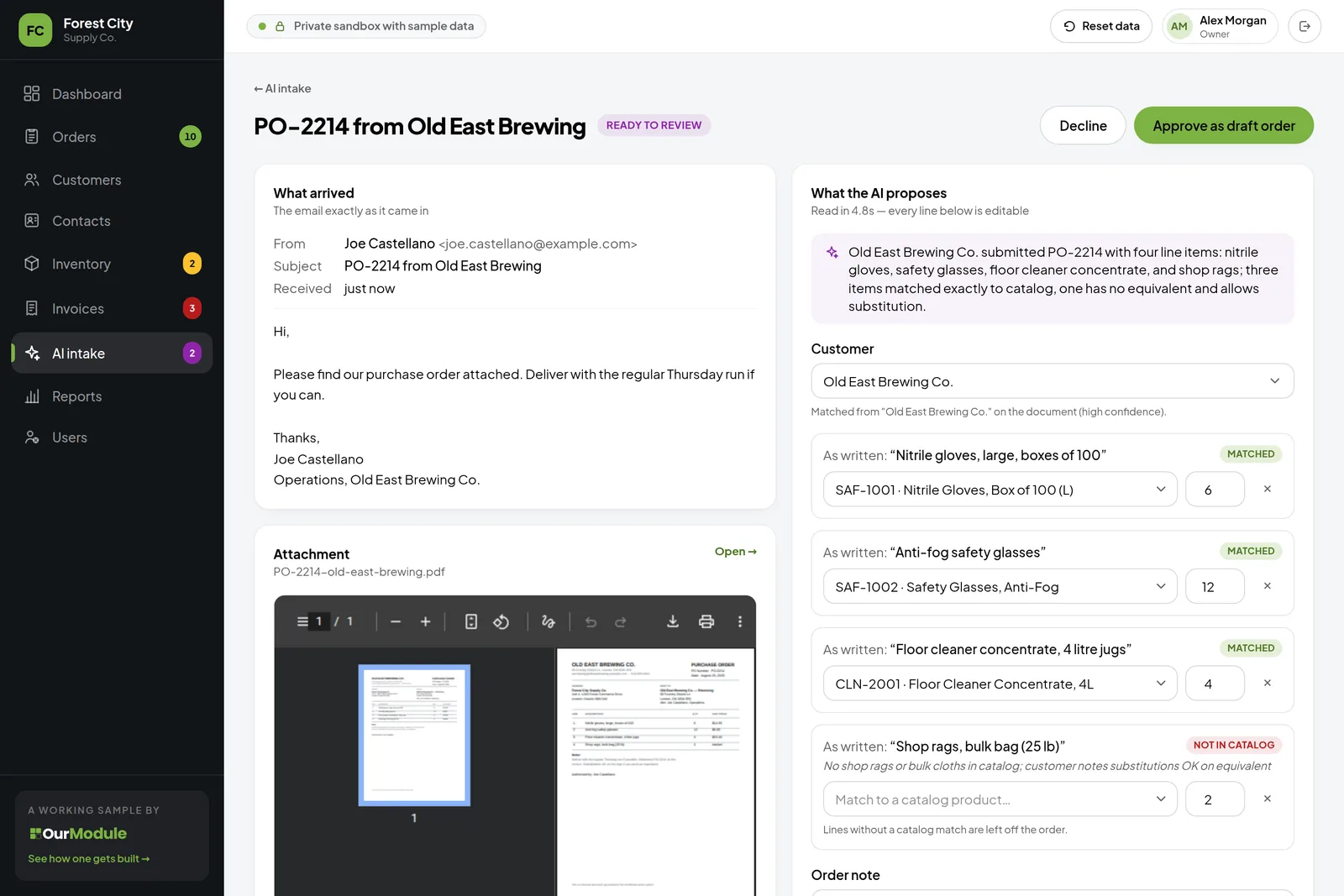
What your AI can take on
AI workflows take on repetitive admin work while you stay in control of everything that goes out the door. Here's what that can look like.

Inbox monitoring
More than sorting: your AI reads each email and its attachments, pulls out the details, and preps them for your business system, ready for your approval.

Automated email reply drafts
Replies drafted in your tone, from your real information. You review, tweak, and send.

Quote and estimate drafts
A draft quote built on your pricing rules, checked against your system, the customer's history, and what is in stock.

Data entry from documents and files
PDFs, photos, spreadsheets, even messy scans. Read, and entered where it belongs.

Report generation
Weekly and monthly numbers, gathered on schedule. Every figure is double-checked by an independent re-run before it reaches you.

Internal knowledge search
Ask in plain English, get the answer from your own documents, manuals, and policies. A five-minute hunt becomes a ten-second answer.

Supplier invoice processing
Supplier bills read from PDFs and photos, matched to what you ordered, coded for your accounting, and queued for one approval.

Booking and appointment requests
Requests from email or your website checked against your calendar, with a reply drafted proposing times. You confirm, it books.
Every process comes with an approval dashboard
Everything the AI produces waits for a human yes in one place. Nothing reaches a customer without a person saying so.
What this looks like in a real week
Three examples of workflows we can implement today.
Ready to send replies
BeforeForty weekend emails, sorted by hand over the first ninety minutes of the week.
AfterSorted and replies drafted by 7 a.m. You approve over coffee, and replies go out from your own email address in your own writing style.
Instant quotations
BeforeTwelve items, a price list, discount checks, and an hour of typing. The third one today.
AfterA draft quote from your pricing rules within a minute. You check it and hit send, from your own address.
No more data entry
BeforeSupplier invoices and delivery slips pile up as PDFs and phone photos until someone retypes them.
AfterEach one is read and entered where it belongs within minutes, flagged for a quick human check. Nothing gets typed twice.
A person approves everything
Every workflow I build runs on the same loop. AI is genuinely useful, but it is not perfect, and it makes mistakes. That is exactly why the loop exists: the AI does the tedious part, and a person always makes the call.
Work arrives
An email, a document, a request. The workflow picks it up the moment it lands.
The AI does the tedious part
It reads, sorts, extracts, and drafts, following the rules you set.
A person approves it
The result waits in your dashboard. You or your staff approve, adjust, or reject it.
It goes out, logged
Only then does anything leave the building. Every step is recorded, so you can always see what was done and why.
The approval dashboard also lets you
Refine the AI's style and rules
In plain English: more professional replies, delivery terms on every quote, one supplier always routed to one person.
See every action, by user
Own logins and permissions for staff. Every AI approval, edit, and rejection is logged against a name and a time.
Add more workflows
Built once and reused. Each new workflow plugs into the same dashboard, and each addition costs less than the first.
Switch the AI model yourself
A setting, not a rebuild. Try a newer model on a test run, compare, and switch when you are happy. If a model is ever retired, flip to a current one in seconds.
What it costs to build
Most first workflows land between $1,500 and $4,000 CAD.
How the price works
- The consultation and the solution proposal are always free. If I can't find you a real way to save time or money, you don't pay a cent.
- The saving compounds: a few minutes saved on a task, every day, adds up fast. A task that eats 5 hours a week costs your business over 250 hours a year, so most workflows pay for themselves within months.
- That price covers one complete workflow: the AI, the connections to your tools, and the approval dashboard. The dashboard is built once, so later workflows reuse it and cost less.
- You get a fixed quote before any work starts, and it never changes unless you ask for something new and approve the cost first.
- Start with one workflow, prove it works, and add the next. Each one is its own small project with its own quote.
What it costs to keep running
- AI usage
- $5 to $50 a month
- You pay the AI provider only for what your workflows actually process, from your own account. A typical email or document costs around a cent, often less.
- Hosting and dashboard
- $0 to $10 a month
- Where the workflow and its approval dashboard live: a global hosting network with a generous free tier, so at this size hosting is often free.
- Email delivery
- Usually free
- Notifications from your workflow, like a heads-up that drafts are waiting, sent through a trusted delivery service so they reach inboxes reliably. The free tier covers 3,000 messages a month.
Everything is paid directly to the providers, in accounts that belong to you, and none of it comes to me. Most workflows run for under $30 a month, and there is no required retainer.
The timeline, step by step
Most first workflows land in 2 to 5 weeks, with the results checked and tuned before anything goes live. Here is how it runs.
Step 1: Talk and pick the task
3 to 5 daysWe find the most repetitive, time-hungry task in your week and agree exactly what the workflow should produce. I talk to the people who do the task today, and you get a fixed quote. Nothing starts until you approve it.
Step 2: Your accounts, your name
about 1 dayThe AI account, hosting, and email are opened in your business's name before anything is built: by me for you, under a new email address just for your workflow that I hand to you at launch, or by you with my guide, adding my login. The AI provider bills by use and needs a payment card, and that is always your own card, added by you. Your data never lives in somebody else's account.
Step 3: Connect and prove it works
1 to 3 weeksI connect the workflow to your inbox, files, or existing system and run it on sample documents like the ones you handle every day. You review the output, and we reshape and refine the rules together until the accuracy is right. Nothing touches live work yet.
Step 4: Go live, with approvals on
2 to 5 daysThe workflow starts handling live work, with every result waiting in the dashboard for a human yes. Nothing is sent or saved without approval.
Step 5: Handover
about 1 dayIf I opened the accounts, a short call of about 15 minutes hands you the workflow's email address, and every account comes with it. If you opened them, there is nothing to hand over. My login stays for the thirty days of support after launch, then I leave and confirm in writing that my access has ended. Everything is yours.

The tech stack, with as little jargon as possible
An AI workflow has fewer parts than you might expect. Below is our proposed tech stack: what each part does for you, and the tried-and-tested service I reach for. Already using AI tools? No problem, we can work with that too.
The AI model
The reading, sorting, and drafting is done by Claude, the AI made by Anthropic that millions of people use every day. Your workflows are connected to a business account in your own name, billed by use rather than by subscription.
Where the workflow runs
The small program that connects the AI to your email, ERP, or other tools runs on Cloudflare, a global hosting network used by some of the internet's busiest sites. Fast, dependable, and often free at this size.
Hosted onCloudflareThe approval dashboard
The screen where the AI's proposed actions wait for your yes, custom-built in React and Node.js, the same technology behind many of the web's biggest sites. It shows what came in, what the AI produced, and what needs your decision.
The record of everything
Every draft, approval, edit, and send is stored in a proper database with automatic backups, so there is always an answer to what happened and when.
Your connections
Your workflow plugs into the tools you already use, and nothing gets replaced. Approved replies go out through your own email address, not a robot's.
Notifications
An optional heads-up email when drafts are waiting or something needs attention, delivered reliably to your inbox instead of vanishing into spam folders.
Delivered byResendVersion history and backups
Every change to your workflow's code is tracked and backed up in your own account. Nothing is ever lost, any change can be undone, and any future developer can see exactly how it is built.
Stored onGitHubModel updates
AI models improve every few months, and your workflow is built so the model behind it can be swapped without a rebuild. It never switches on its own, because each new model behaves a little differently. When you want to move, a setting in your approval dashboard lets you try a newer model on a test run, compare the results, and switch when you are happy. If a model is ever retired, you flip to a current one yourself, in seconds.
Is it safe?
Two fair questions: where does your data go, and what can the AI reach? Here are the short answers.
Only what you connect
The AI sees exactly the inbox, folder, or system feed we wire in, and nothing else. It does not get the run of your email accounts or your systems.
Not training material
Your workflows use Claude through a business account, and Anthropic's business terms put it in writing: your emails and documents are not used to train the AI.
In your accounts
The AI account and every other service signed up under your business name, always in your sight.
Never locked in
We use mainstream tools any developer can pick up. Never tied to me, or to them.
Pay by the drop
AI is billed per use, in cents. No seats, no subscription, no minimum.
Never stuck on an old model
Models improve every few months, and yours is a setting in your dashboard, not a rebuild. If one is ever retired, you switch to a current one in seconds.
This is my go-to stack, tried and tested. Prefer a different AI provider? I can build with that too.
Is this the right tier for you?
- A single quote takes an hour to put together, and more are waiting
- Orders and invoices get retyped by hand from emails into your ERP or spreadsheets
- Staff lose time digging through SOPs and manuals for answers a search could find in seconds
- Weekly numbers are compiled by hand from three different places
I love what AI can do, but I still believe it needs a person approving every step, so that is how every workflow here is built: your AI drafts and prepares, and your team decides what your customers see.
After launch
- You own everything: the code, the accounts, the AI account, the data. There is nothing to buy back and no required monthly retainer.
- You get plain-language documentation explaining how your workflow fits together, so you are never lost, and any future developer could pick it up quickly.
- If something I built turns out to have a fault, I fix it, and that is not billable work. Changes to outside services, changes made by others, and new requests get a fixed quote first.
- Workflows are meant to be tuned and iterated on: tone, rules, and formats adjust as your business changes. Small tweaks are quick, and anything substantial gets its own fixed quote first.

Yours from launch day
Spend $4,000 once.
Save about $34,000 a year.
A simple example of an AI order intake workflow. Let's say you're a small wholesaler with a three-person order desk, and your purchase orders arrive by email every day.
Step 1: Today
60
emailed orders a day
3 people on the order desk, manually entering about 20 orders each into your ERP
Step 2: Typed by hand
6 h
a day, retyping emails into orders
About 6 minutes each: read the email, find the customer and products, key in the lines
Step 3: With AI intake
1.5 h
a day, checking and approving
AI can read the email instead and stage each order for a person to check and approve in about 90 seconds
Step 4: Given back
4.5 h
a day, back to the business
About 1,100 hours a year, or $34,000 at $30 an hour
A workflow like this costs about $4,000 to build and around $30 a month to run. It pays for itself in about 7 weeks, then keeps giving back roughly $34,000 a year, every year, in time the order desk spends on customers instead of retyping.
An illustration, not a quote. Your numbers depend on your volumes and wages; the free consultation works them out for your business.
Let's talk about your first workflow
Tell me which task eats the most time in your week and I'll reply with practical next steps and a fixed quote. The conversation and the proposal are free.